GeMarkt Blog · Reference
The Best Museum Open-Access Collections: Met, AIC, Rijksmuseum, NGA, Getty
Find reusable museum art through five institutional collections. Check the exact object, image rights and download before choosing a file for your project.

The best museum source is the one that identifies your artwork clearly, supplies a suitable file and states how that image may be reused. The Met, the Art Institute of Chicago, the Rijksmuseum, the National Gallery of Art and Getty offer useful routes, but none should be treated as a website where every visible picture is automatically free to reproduce.
Start with the work you need, not a promise about the largest collection. A clear scan of the wrong edition is still the wrong file. Equally, a detailed object description does not guarantee a downloadable image or permission to republish it. This guide compares the museums’ current routes and explains how to make a practical file choice, rather than ranking them by a supposed universal image quality.
Choose a source for the picture you need
Search by artist and title, then use dates, materials and accession numbers to distinguish similar results. For a print, check the impression or edition; for a painting series, check which canvas you have found. Save the object page before following an image into a separate viewer.
The museums provide different clues to reuse. Treat these as places to investigate, not as permission inferred from a logo:
| Collection | Useful starting point | What to establish before reuse |
|---|---|---|
| The Met | Open Access collection route | The exact image’s OA designation and terms |
| Art Institute of Chicago | Public-domain discovery through its collection/API | The image-specific permission, not just the data licence |
| Rijksmuseum | Collection record and image-request information | Its Public Domain or CC0 notice and the chosen file |
| National Gallery of Art, Washington | Object-page open-access download | That the particular image falls within its CC0 policy |
| Getty | Art Collection or Research Collections | Open Content designation and the available download |
The Met: look for the Open Access image
The Met’s Open Access hub links to its online collection and identifies qualifying images through an OA icon. Its programme makes public-domain artwork images available under CC0. Follow that route, open the individual record and check the designation attached to the image you want.
The Image and Data Resources policy separates public-domain or waived-rights images from images under copyright or other restrictions. It also distinguishes collection data from images. An artist name or a date appearing in an open dataset does not mean every associated photograph is released on the same basis.
When an appropriate image is missing, use the museum’s request route rather than taking a screenshot from another source and attaching the Met’s credit. Keep the accession number with your download so that a later caption still points to the right object.
AIC: keep the image permission separate from data
For the Art Institute of Chicago, the official API documentation supports searching for artworks marked public domain. Crucially, it warns that the image service can also expose images that are not public domain. Being technically accessible is not the same as being available for your use.
Use the result to locate the object record, then read the image’s rights notice and the museum’s linked licensing information. The API’s licence for descriptive data must not be substituted for image permission. If you cannot establish the current image terms, contact the museum or use another clearly documented source; a public-domain search flag is not the whole record.
This matters especially when comparing files from several sites. Keep the AIC record number, image identity and rights evidence together. Do not give a file from an unrelated uploader the museum’s permission merely because it depicts the same painting.
Rijksmuseum: use the current collection record
Begin in the Rijksmuseum Collection. Its Collection Online guidance explains that qualifying reusable images carry a Public Domain or CC0 notice under the copyright information. Read that statement on the record rather than assuming that every result has it.
The museum’s image-request page says most, not all, artwork images can be downloaded from their pages. It also provides a request route for professional TIFF files with colour reference and other image needs. Do not assume that the same file size, format or request conditions apply to every object.
Rijksmuseum asks users to credit it as the source and encourages using its latest images. When replacing an older download, keep both versions until you have checked which one your existing caption and layout describe. A changed crop can affect a design even when the artwork itself is unchanged.
NGA: open access is an express exception
At the National Gallery of Art in Washington, the Terms and Notices page expressly releases qualifying open-access artwork images under CC0 for commercial and non-commercial use. Those images are downloadable from object pages. This is an important exception within a website whose general terms are more restrictive; read the applicable image provision, not only the footer.
The policy also explains why an image might not be available, including uncertain copyright, contractual restrictions or the lack of a suitable photograph. An absent download does not prove that the artwork is copyrighted, but it is not permission to extract a different image either.
Save the collection credit and the image’s open-access record. The museum encourages a courtesy credit, does not grant exclusive use and does not endorse projects merely because they use its images. Its policy also cautions that other parties may have rights under different countries’ laws.
Getty: follow the Open Content label
Getty’s Open Content programme directs users to the Art Collection and Research Collections. Look for the CC0-public domain designation on the particular record. This is Getty’s museum and research programme, not the commercial Getty Images service.
The Open Content FAQ explains the image-download control and, where available, additional size choices. Use the available download, then inspect that actual file. A visible image without a download may have different rights or availability constraints.
Getty describes the programme’s underlying works as public domain in the United States and waives its own image rights through CC0 to the extent it holds them. That does not settle every third-party right or another country’s treatment. Preserve the artwork credit and identify Getty’s Open Content Programme as the digital source without implying endorsement.
Check the file before planning the print
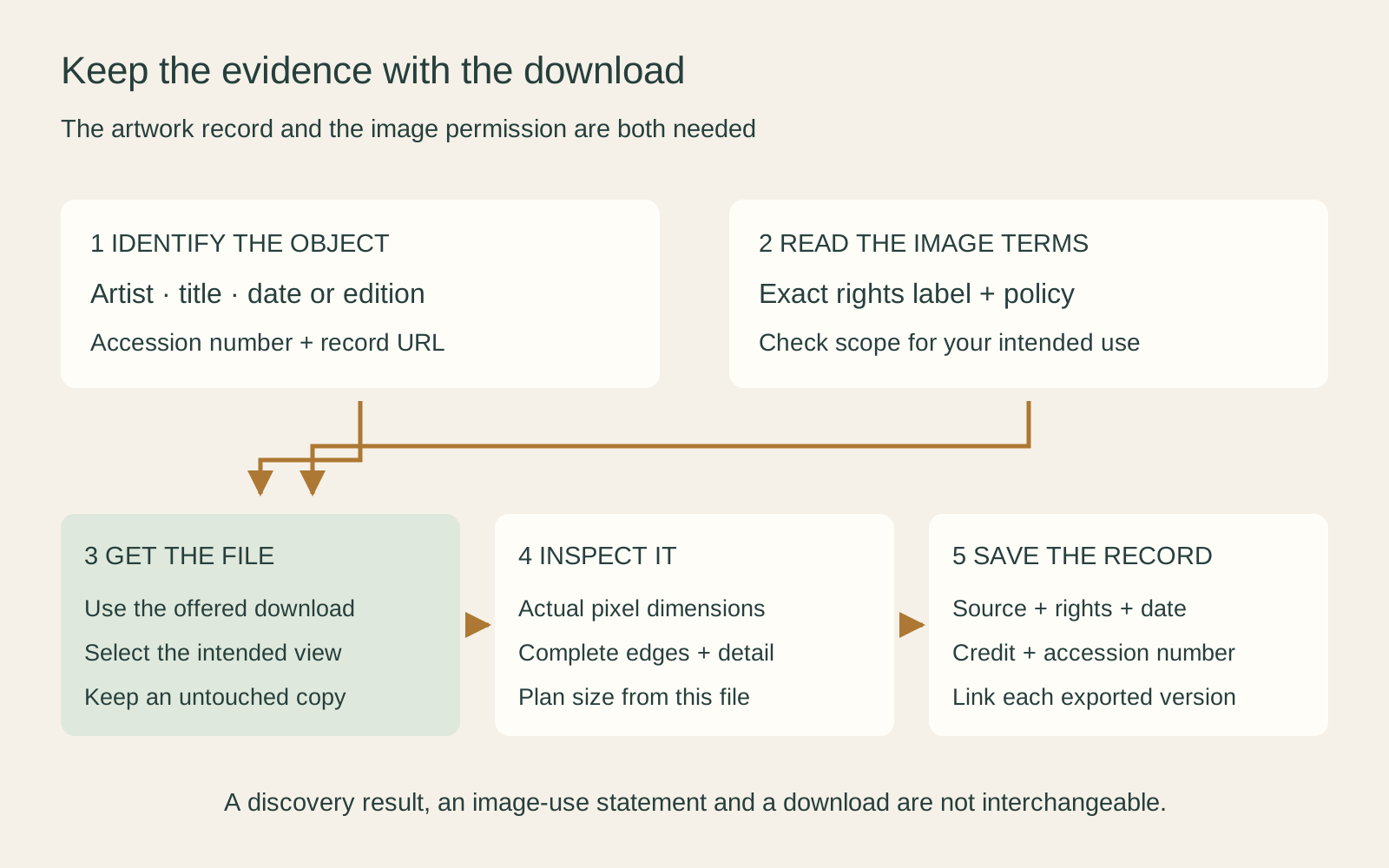
Once you have a documented download, open it outside the browser. Check the pixel dimensions, the complete image edges and any colour target, border or mount included in the photograph. Inspect small details at ordinary viewing size as well as close up. A filename containing “large” is less informative than the actual file.
As an illustrative calculation, a 4,000-pixel-wide image placed across 20 inches supplies 200 pixels per inch: 4,000 ÷ 20. If you crop away a quarter of that width, the remaining 3,000 pixels supply 150 PPI at the same print width. These are arithmetic examples, not claims about any museum download or promises of a successful print.
Discuss the intended size and process with your printer; see image resolution and print size for the fuller decision. Do not enlarge the file and treat its new dimensions as proof that the museum captured more detail. Keep an untouched source copy before preparing derivatives.
Save a small but useful source record
Make a note containing the artist, work title, date or edition, museum accession number, object URL, download date and the applicable image-rights statement. Keep the supplied credit, filename and dimensions with it. If the record offers several views, note which one you selected: a detail, a reverse or a framed installation is not interchangeable with a complete front view.
For a hypothetical exhibition handout, this lets an editor check both the caption and the reproduction permission without repeating the whole search. For a print project, it keeps the unedited source traceable after you create a different crop or export size. It is a modest habit that prevents useful files becoming anonymous images in a folder.
Our guide to CC0 and museum licences explains the labels; the credit guide helps turn the record into a readable caption. Clear permission and a suitable image matter more than a download button alone.
Editorial record
About this article
- Author
- Publisher
- GeMarkt
- Published
- Reviewed
- Internal source & rights check. Conducted by GeMarkt Research Review. This is an internal editorial check—not independent peer review.
- Source standard
- Rights guide source standardSeparates the underlying work from the source file, records the review date, and links the evidence used for the conclusion.
Found a claim that needs checking? Report a factual error.