GeMarkt Blog · Practical guide
Detail Prints: Cropping Famous Paintings
Choose a detail print without an accidental crop: check the composition, remaining pixels, printed image size and the part a frame will cover.

A detail print can work beautifully when you want to look closely at one part of a painting. Choose it because that detail interests you, not because an unsuitable frame happens to cut away the rest. Before ordering, compare the crop with the complete composition, check the remaining image resolution and confirm exactly what will be visible after framing.
Choose the detail before the frame
Start with a question: what do you want to see more clearly? It might be the hands in a portrait, a cluster of flowers or the meeting of sea and sky. That gives the crop a purpose. A rectangle chosen only to fit an empty wall can leave a face uncomfortably close to the edge or remove the thing another figure is looking at.
Keep the complete image beside your proposed detail while deciding. Try a slightly wider and a slightly narrower version. Look at each on its own as well as against the original: an attractive fragment does not have to repeat the whole painting’s story, but it should not feel like an accidental cut.
A thumbnail is useful for judging the overall shape. An enlarged view is useful for checking faces, lettering, signatures and edges. You need both views; a crop can look balanced when small and reveal an awkwardly cut hand when enlarged.
Ask what the crop leaves out
In Hokusai’s Great Wave, the wave, boats and distant mountain have a relationship. The Metropolitan Museum’s account of its impression specifically draws attention to the three boats and Mount Fuji beneath the crest. A wave-only detail might make an appealing pattern, but removing the people and mountain changes how that scene is read. It should be presented as a detail, not as the complete print.
The same test works with less famous pictures. Does a portrait still include the object the sitter holds? Does a landscape retain the horizon that gives it depth? Does a botanical detail keep the flower attached to enough of its stem to make visual sense? These are questions to look at, not rules that forbid experimentation.
For a closer discussion of the full Hokusai composition, see the story behind the Great Wave. Understanding the whole picture makes a deliberate detail easier to choose.
Cropping is not stretching
Cropping removes part of an image from the visible result. Stretching changes its proportions: a circle becomes an oval, and a face becomes narrower or wider. To preserve the shapes within a detail, resize it proportionally after selecting the crop.
There is also a third option: retain the complete image and leave a border on the sheet. That is often a better answer when you like the full composition but own a frame with a different ratio. Our guide to painting proportions and standard frames compares fitting the full picture with filling the available rectangle.
If you prepare a file yourself, preserve an untouched source and work on a copy. Check the crop tool’s settings before exporting: a preset may resize the result as well as select an area. Adobe’s image-size guidance distinguishes pixel dimensions from print resolution and explains that resampling changes the pixel count. A larger number in an export box is not proof that the original contained more detail.
Count the pixels that remain
Imagine a landscape file measuring 6,000 pixels wide by 4,000 high. A central portrait crop measuring 3,000 by 4,000 retains half the width and half the area: 12 million pixels from the original 24 million.
At a printed image size of 12 by 16 inches, that crop has 250 pixels per inch in both directions: 3,000 divided by 12, and 4,000 divided by 16. This is arithmetic, not a promise that every source will print well. Focus, compression, scanning quality, paper and the printer’s requirements still matter.
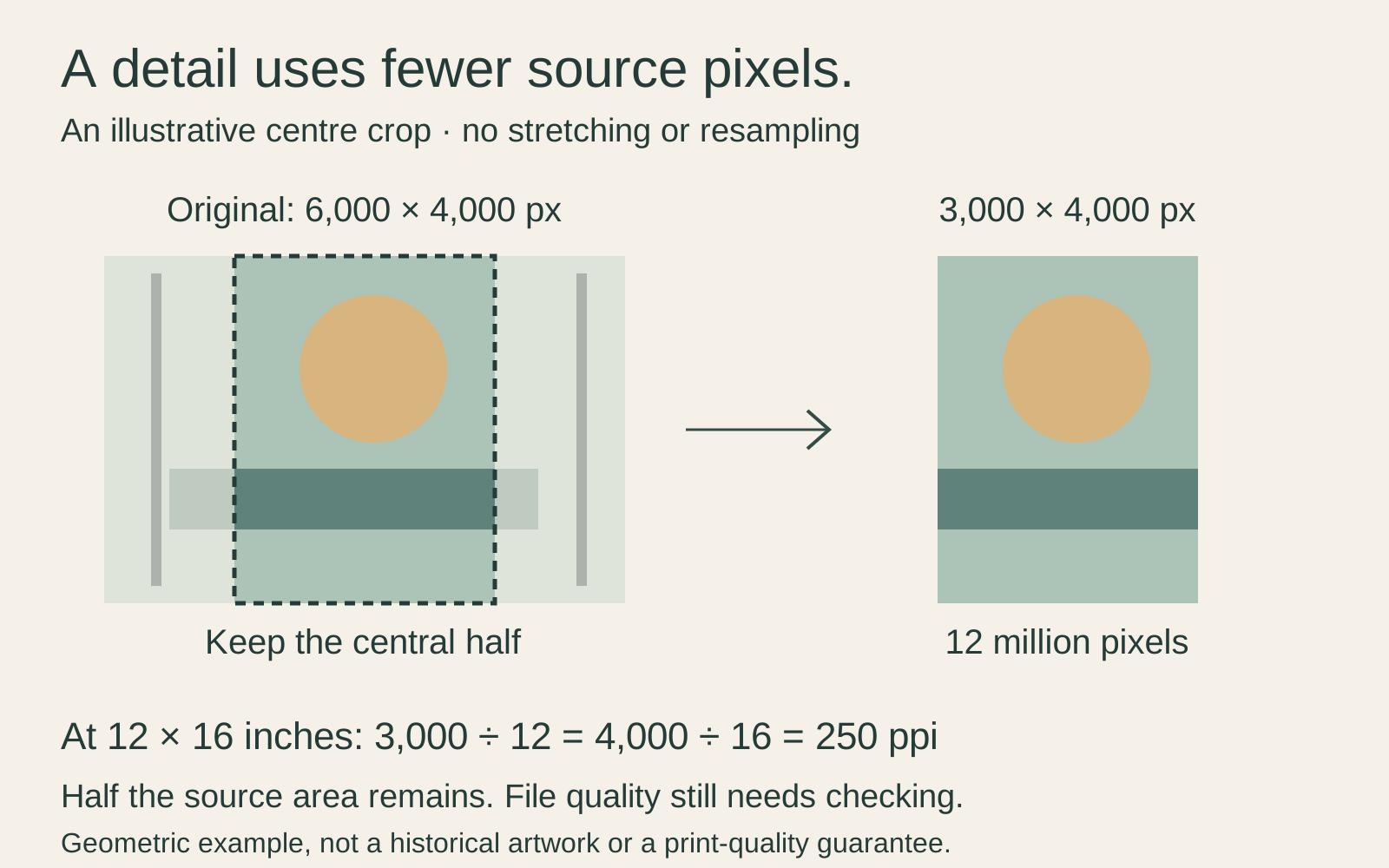
Notice what happens if you ask for a much smaller detail. You do not keep all 24 million original pixels merely because you started with a large file. Ask for a proof of the selected area at the intended print size, especially where fine lines or small faces matter.
Allow for the finished edge
The crop visible on screen is not always the complete description of the finished object. A paper print may have an unprinted border. A window mat may overlap a small amount of the image. A canvas production file may reserve image area for its sides. These are different decisions; do not treat them all as one crop.
Ask the supplier to show the front-facing image and explain any edge allowance. On framed paper, establish the visible mat opening rather than relying solely on the sheet dimensions. The Canadian Conservation Institute’s framing guidance also explains why framing depth and separation from glazing matter. A pleasing rectangle is only one part of a suitable frame.
Check the description and proof
A useful listing identifies the artist and work, says that the image is a detail and shows the actual crop. Ideally, you can also see the full composition for comparison. A room mockup alone may make it difficult to judge a missing edge.
Check the source and reuse terms for the particular digital file, too. Cropping does not remove those conditions. Do not assume that a famous old painting makes every photograph or download interchangeable.
Before approving a custom detail, write down its image size, sheet size, orientation and treatment of the edges. Keep the approved preview. This makes it much easier to distinguish an intentional choice from a production mistake later.
When to keep the whole picture
Keep the complete composition if the detail loses what you love about the work, if the available crop is too soft at your intended size, or if nobody can explain the finished edges. A smaller full image with a border can be more satisfying than a larger fragment chosen reluctantly. The right detail is one you would still choose even if you had room for the whole painting.
Editorial record
About this article
- Author
- Publisher
- GeMarkt
- Published
- Reviewed
- Internal source & rights check. Conducted by GeMarkt Research Review. This is an internal editorial check—not independent peer review.
- Source standard
- Buying guide source standardSeparates measured or first-hand evidence from general guidance and keeps practical limits visible.
Found a claim that needs checking? Report a factual error.